 All Posts


Shopify makes it easy to sell. It doesn't make it easy to spot fraud.
Every day, Shopify merchants approve orders that look legitimate on the surface but carry real fraud risk underneath. By the time a chargeback arrives - 60 to 90 days after the transaction - the product is gone, the customer is unreachable, and the loss is locked in.
Shopify fraud analysis is how you close that gap. It's the process of reading your order data, identifying risk signals, and making informed decisions before fulfillment - not after.
What Shopify's Built-In Fraud Indicators Actually Tell You
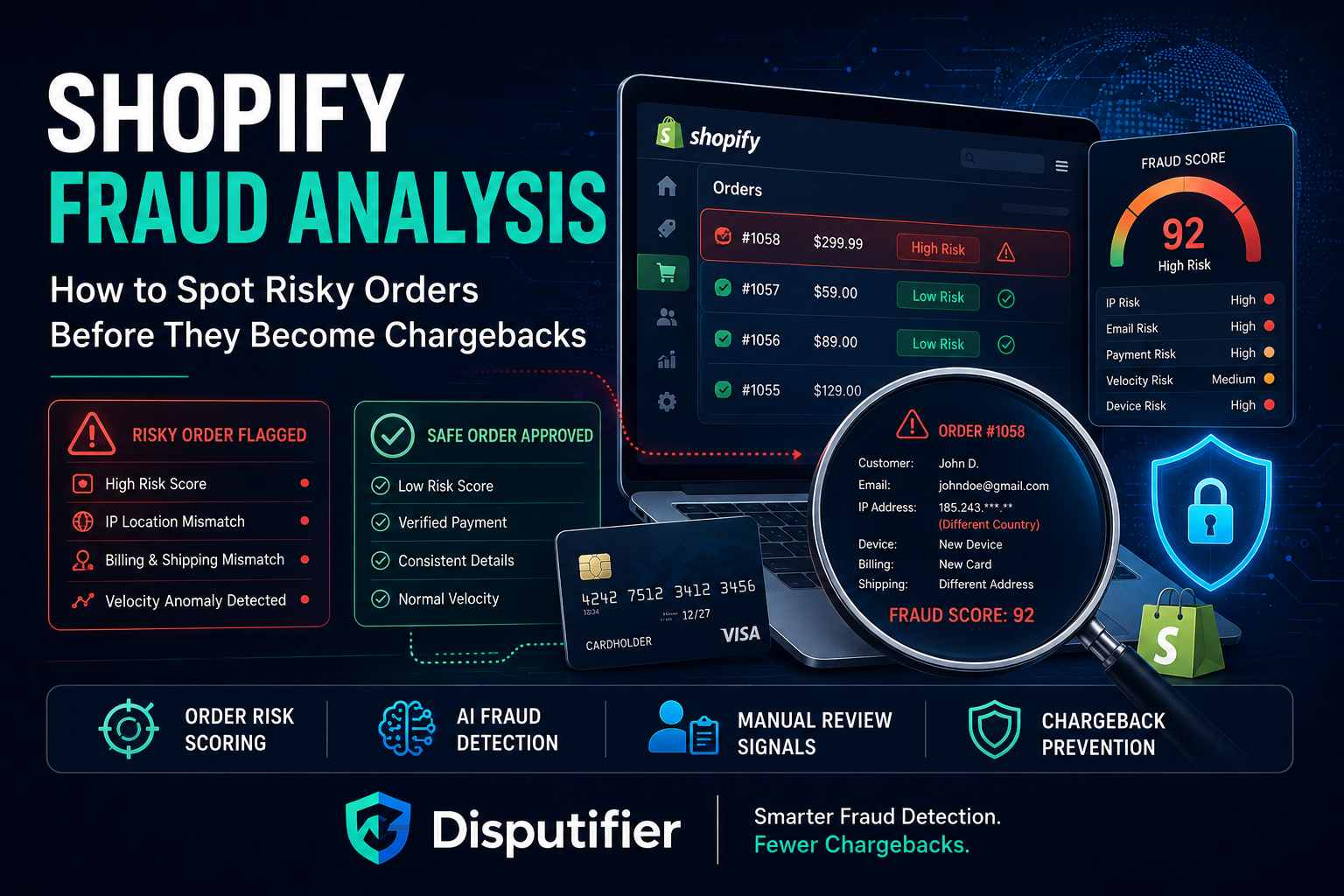
Shopify flags orders with risk indicators automatically - low, medium, or high - based on signals like AVS mismatches, card verification failures, and proxy IP detection. These indicators are a useful starting point. They're not a complete fraud analysis system.
Shopify's native fraud scoring doesn't account for your specific store's fraud history, your product category's risk profile, or behavioral patterns unique to your customer base. It applies the same logic to every merchant on the platform regardless of context.
That means Shopify's fraud flags can both over-flag and under-flag. A legitimate international customer buying a gift gets flagged. A sophisticated fraudster using a clean IP and a valid card sails through.
Shopify fraud analysis that actually works goes beyond the native indicators. It combines Shopify's signals with BIN intelligence, order pattern analysis, and historical chargeback data to build a more accurate picture of each transaction.
The Fraud Signals Shopify Merchants Should Be Watching
Billing and Shipping Address Mismatches
A different billing and shipping address isn't automatically fraud - gift purchases happen constantly. But a mismatch combined with other signals is worth scrutinizing.
Pay attention to the combination: mismatch plus a new account, mismatch plus expedited shipping, mismatch plus a high-value order. Any one of those alone is low risk. All three together is a different story.
BIN Data Conflicts
The Bank Identification Number - the first six to eight digits on a card - tells you where the card was issued, who issued it, and what type of card it is. When that information conflicts with the customer's billing address, shipping destination, or IP location, it's one of the strongest fraud signals available.
A card issued in Eastern Europe billing to a US address shipping to a freight forwarder is a red flag. A US-issued card with a matching billing address and a clean IP is not.
Use Disputifier's free BIN checker to validate card data on flagged orders before making a decision. It takes seconds and gives you information Shopify's native tools don't surface.
Velocity Patterns
Multiple orders placed in quick succession from the same IP address, device, or email domain - especially using different card numbers - indicate card testing or BIN testing activity.
What is card testing and how to stop it covers this attack pattern in detail. Fraudsters run small test transactions through your store to validate stolen card data before using it elsewhere. Those small transactions generate real chargebacks that hit your ratio.
Velocity monitoring catches this pattern early. If you see five orders from the same device in 30 minutes with slightly different card numbers, that's not organic traffic.
New Account + High-Value Order
A brand-new customer account placing a large, high-demand order - especially with expedited shipping - is worth a second look. Legitimate first-time buyers do place high-value orders, but this pattern also describes a high percentage of fraud attempts.
Cross-reference with BIN data and IP signals. If everything else looks clean, the order is probably fine. If other signals are elevated, hold it for review.
Proxy or VPN IP Addresses
Fraudsters routinely use proxies, VPNs, and Tor exit nodes to mask their real location. When an order's IP resolves to a proxy or anonymizing service, it's a meaningful signal - not conclusive on its own, but worth factoring into your overall risk score.
Shopify flags some of these automatically. Others slip through. Adding a dedicated fraud screening layer catches what Shopify misses.
How to Build a Shopify Fraud Analysis Workflow
A consistent review workflow is what separates merchants who catch fraud early from those who discover it on their chargeback statement.
Step 1: Set your risk threshold. Decide which combination of signals automatically holds an order for review versus auto-approves it. Base this on your own historical data - which order patterns have resulted in chargebacks? That's your starting point.
Step 2: Route flagged orders to a review queue. Don't approve or cancel immediately. Look at the full signal picture: BIN data, AVS result, IP, order history, account age, shipping speed, and product type. How to review high-risk orders without killing conversions walks through this process in detail.
Step 3: Use BIN validation on ambiguous orders. When an order is borderline - one or two elevated signals but nothing definitive - BIN data often provides the clarity you need. A card issued in the same country as the billing address with no proxy IP is very different from one that doesn't match anything the customer provided.
Step 4: Request verification when needed. For orders that remain ambiguous after review, ask the customer to confirm their billing address or verify via a secondary contact method before approving. Legitimate customers respond. Fraudsters usually don't.
Step 5: Document your decisions. Keep records of why you approved or declined flagged orders. That documentation matters for dispute responses if a fraud order slips through and generates a chargeback.
What Shopify Fraud Analysis Tells You About Your Chargeback Risk
The orders you approve today determine your chargeback ratio in 60 to 90 days. Shopify fraud analysis isn't just about stopping fraud - it's about protecting your merchant account from the downstream consequences.
Shopify chargeback percentage explains how your ratio is calculated and what happens when it climbs too high. Merchants who consistently approve risky orders without a review process tend to find out about their fraud problem when their processor flags them - not when the orders come in.
Ecommerce fraud detection covers the full signal set beyond what Shopify surfaces natively. Building your analysis on a broader data set means fewer fraudulent orders slip through and fewer chargebacks hit your ratio.
How Disputifier Strengthens Shopify Fraud Analysis
Disputifier is chargeback prevention and dispute management software built specifically for ecommerce merchants - including Shopify stores. It extends your fraud analysis capability well beyond what Shopify's native tools provide and automates the dispute response process when fraudulent orders do result in chargebacks.
BIN intelligence at the order level. Disputifier's free BIN checker validates card data in real time, surfacing issuer country, card type, and risk signals the moment an order comes in. That BIN data feeds directly into your fraud analysis before fulfillment decisions are made.
Real-time dispute detection. When a Shopify order does generate a chargeback, Disputifier detects it immediately through direct integration. It triggers an automated evidence-building workflow - pulling order records, fulfillment data, and customer communication from your Shopify store - and submits a response before the deadline closes.
No manual evidence gathering. Disputifier pulls everything it needs from your store automatically. Your team doesn't manually compile order records or track down shipping confirmations. The evidence package is built and submitted without manual effort.
Analytics that improve your fraud analysis over time. Disputifier surfaces the patterns in your chargeback data - which order types, product categories, and customer segments generate the most disputes. That visibility lets you refine your fraud analysis thresholds based on real outcomes, not generic benchmarks.
Alert integrations that stop disputes before they're filed. Disputifier integrates with Ethoca and Verifi alert networks, giving Shopify merchants a window to resolve potential disputes before they become formal chargebacks. Resolved alerts never hit your chargeback ratio.
How to prevent chargebacks in Shopify stores covers the prevention side in full - Disputifier handles both prevention and response in one platform.
If you're relying on Shopify's native fraud indicators alone, you're working with incomplete information. Add Disputifier to your Shopify store and start catching fraud before it ships.
Frequently Asked Questions
**What is Shopify fraud analysis?**Shopify fraud analysis is the process of evaluating orders for fraud risk signals before fulfillment. It goes beyond Shopify's built-in risk indicators to include BIN data, velocity patterns, IP analysis, and order history - giving merchants a more accurate picture of which orders to approve, review, or decline.
**Are Shopify's built-in fraud indicators enough?**For basic screening, they're a useful starting point. For accurate fraud detection, they're insufficient on their own. Shopify's native scoring doesn't account for your store's specific fraud history, product risk profile, or the BIN data behind each card used - all of which are critical inputs for accurate analysis.
**What does BIN data tell me about an order?**BIN data identifies the issuing bank, card type, and country where the card was issued. When that information conflicts with a customer's billing address, shipping destination, or IP location, it signals elevated fraud risk. Disputifier's free BIN checker lets you validate this in seconds.
**How do I know which Shopify orders to review manually?**Build a tiered system based on your own historical chargeback data. Orders that hit multiple risk signals - BIN mismatch, AVS failure, new account, high value, expedited shipping - go to manual review. Orders that clear all signals auto-approve. Ecommerce risk scoring covers how to build that framework.
**What's the connection between Shopify fraud analysis and chargebacks?**Every fraudulent order you approve today is a potential chargeback 60 to 90 days later. Fraud analysis catches those orders before fulfillment - eliminating the root cause before it becomes a ratio problem that threatens your merchant account.
**Does Disputifier integrate directly with Shopify?**Yes. Disputifier connects directly to your Shopify store, pulling order data, fulfillment records, and customer communication automatically. It uses that data for both pre-fulfillment fraud signals and automated dispute evidence when chargebacks are filed.
**What happens if a fraudulent order slips through my review process?**It will likely generate a chargeback 60 to 90 days later. Disputifier detects that chargeback in real time, builds an automated evidence response from your Shopify order data, and submits it before the deadline - giving you the best possible chance of winning even when fraud slips through.
Run Smarter Shopify Fraud Analysis - Before Chargebacks Hit Your Ratio
Shopify fraud analysis isn't about blocking every suspicious order. It's about making accurate decisions quickly, catching real fraud before it ships, and protecting your chargeback ratio before your processor notices it.
Disputifier gives Shopify merchants the BIN intelligence, real-time fraud signals, and automated dispute response to do all three - without adding manual overhead to your operations. Stop relying on Shopify's native indicators alone. Get started with Disputifier today.